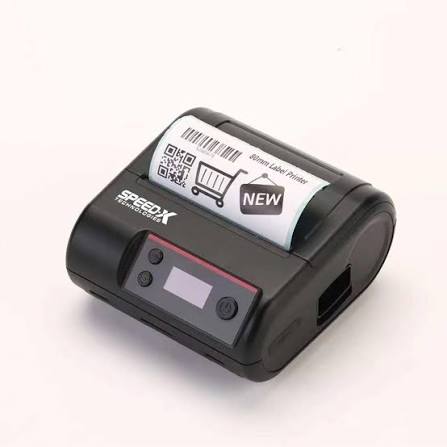

Receipt printers play an important role in modern business operations by helping organizations generate transaction records quickly and accurately. From retail stores and restaurants to hotels, healthcare facilities, and transportation services, these devices support daily activities that require printed receipts, bills, tickets, and order records. Their ability to integrate with point-of-sale (POS) systems makes them valuable tools for improving transaction efficiency and customer service.
As businesses increasingly adopt automated payment systems, understanding how a Receipt Printer works across different industries can help organizations choose suitable printing solutions. Although the basic printing process remains similar, the technology, configuration, and applications may vary depending on the working environment.
Understanding How Receipt Printers Work
A receipt printer is a specialized device that converts digital transaction information into printed documents. It usually operates alongside a POS terminal, computer, cash register, or mobile device.
When a customer completes a purchase, the POS software collects relevant information, including product descriptions, quantities, prices, taxes, discounts, and payment details. This information is then sent to the connected printer through a communication interface.
The printer processes the incoming data and produces a physical receipt. Depending on the model, it may use thermal, impact, or inkjet printing technology.
Thermal printers are particularly common because they use heat-sensitive paper instead of traditional ink. Impact printers use an ink ribbon and mechanical printing pins, while inkjet models use liquid ink to produce text and graphics.
How Receipt Printers Support Retail Businesses
Retail environments depend on fast and accurate transactions, particularly during busy shopping periods. Receipt printers help stores maintain an organized checkout process by generating purchase records immediately after payment.
Checkout and Payment Processing
At checkout counters, receipt printers connect directly to POS systems. Once the cashier completes a transaction, the software sends the purchase information to the printer.
The resulting receipt typically includes product names, prices, quantities, applicable taxes, discounts, payment methods, and transaction numbers. This information helps customers verify purchases and provides businesses with documentation for accounting purposes.
Returns and Exchanges
Printed receipts also make product returns and exchanges easier to manage. Retail employees can use transaction details to verify purchase dates, prices, and payment information before processing a return.
Promotional Information
Some businesses include discount codes, promotional messages, loyalty program details, and upcoming offers on their receipts. This allows retailers to communicate additional information without requiring separate printed materials.
Applications in Hospitality Businesses
The hospitality industry relies on efficient communication between employees, customers, and different departments. Receipt printers help restaurants, cafes, hotels, and other service providers manage transactions and operational activities.
Restaurants and Cafes
Restaurants use receipt printers to generate customer bills and kitchen order tickets. When an employee enters an order into the POS system, the information can be sent automatically to a printer located in the kitchen or preparation area.
Kitchen staff receive details about selected dishes, quantities, special instructions, and table numbers. This reduces communication errors and helps employees prepare orders more efficiently.
Impact printers are sometimes preferred in kitchen environments because they can work with multi-part paper and are suitable for certain demanding operating conditions.
Hotels and Resorts
Hotels use receipt printers at reception counters, restaurants, and other service departments. These devices generate payment confirmations, accommodation bills, restaurant receipts, and service records.
Integration with hotel management software helps employees retrieve transaction information and prepare accurate customer bills.
Cafeterias and Food Courts
High-volume food service locations benefit from compact thermal printers that can quickly produce customer receipts. Their fast operation helps reduce waiting times during busy meal periods.
How Other Industries Use Receipt Printers
Beyond retail and hospitality, receipt printers support several specialized business environments.
Healthcare and Pharmacies
Pharmacies use receipt printers to generate purchase records for medicines, healthcare products, and other retail items. These receipts help customers maintain payment documentation and assist businesses with transaction management.
Healthcare facilities may also use compact printers for billing counters and payment confirmation.
Banking and Financial Services
Banks and financial institutions use specialized thermal printing technology to produce transaction slips, deposit confirmations, and other printed records. These documents provide customers with immediate confirmation of completed activities.
Transportation and Parking Services
Transportation companies use receipt printers to produce tickets, fare records, and payment confirmations. Parking facilities also rely on compact printers to issue entry tickets and payment receipts.
Logistics and Warehousing
In logistics environments, printing devices support transaction documentation, package identification, and operational recordkeeping. Depending on the application, businesses may use receipt printers alongside barcode and label printers.
Important Technologies Behind Receipt Printing
Different printing technologies allow businesses to select equipment based on their operational requirements.
Thermal printing: Thermal printers use a heated printhead to create text and graphics on specially coated paper. They offer quiet operation, fast output, and reduced consumable requirements.
Impact printing: Impact printers use mechanical pins and ink ribbons to produce characters. They are useful when businesses require duplicate copies or printing on multi-part paper.
Inkjet printing: Inkjet printers spray small droplets of liquid ink onto paper. They can produce detailed graphics and colored content, although they are less common in standard POS environments.
The choice of technology depends on factors such as printing volume, environmental conditions, maintenance requirements, and document type.
Factors to Consider When Selecting a Receipt Printer
Choosing suitable printing equipment requires evaluating several practical factors.
- Printing speed: High-speed printing is useful for busy checkout counters and restaurants.
- Connectivity: USB, Ethernet, Bluetooth, and Wi-Fi options provide different integration possibilities.
- Paper compatibility: Businesses should check supported paper widths, roll sizes, and paper types.
- Print quality: Clear text and readable barcodes help ensure accurate transaction records.
- Durability: Commercial environments require equipment capable of handling frequent daily use.
- Software compatibility: The printer should work with the existing POS system and operating software.
- Maintenance: Easy paper loading, accessible components, and reliable cutters can simplify routine operations.
Considering these features helps businesses avoid compatibility problems and select equipment that matches their daily workload.
The Growing Role of Receipt Printers in Modern Business
Receipt printing continues to develop as businesses adopt cloud-based POS platforms, mobile payment solutions, and automated checkout systems. Wireless connectivity allows employees to use printers in more flexible locations, while improved hardware integration supports faster communication between business applications and printing devices.
Environmental considerations are also influencing the industry. Some organizations are introducing digital receipts and reducing unnecessary paper printing. Others are exploring more efficient hardware and paper-management practices.
Despite these changes, physical receipts remain important in many situations where customers require immediate printed transaction records.
Conclusion
Receipt printers support essential business activities across retail, hospitality, healthcare, transportation, banking, and other industries. By converting digital transaction information into printed records, they help organizations maintain accurate documentation, improve communication, and simplify customer interactions.
Understanding how these devices work and where different printing technologies are most effective makes it easier for businesses to select suitable equipment. With continued developments in connectivity, printing performance, and POS integration, receipt printers will remain an important component of efficient commercial operations.