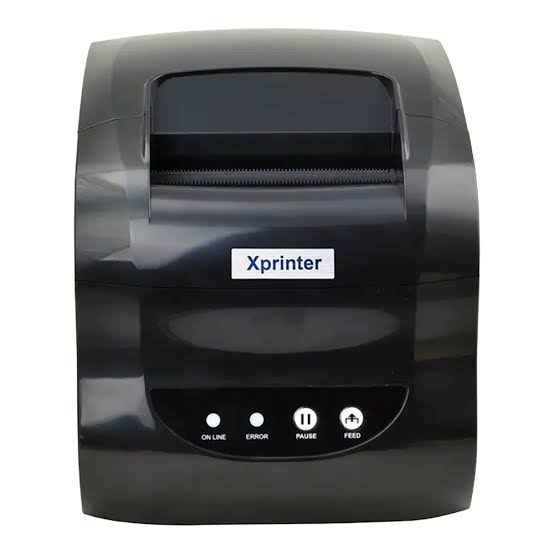

Receipt printing plays an important role in modern business operations. Retail stores, restaurants, supermarkets, pharmacies, and service providers rely on printed transaction records to support payments, customer service, and daily business management. As point-of-sale systems become more advanced, businesses increasingly require printing equipment that combines reliable performance, convenient connectivity, and straightforward operation.
Thermal printing technology has become a popular solution because it produces text and graphics without requiring traditional ink cartridges or toner. Understanding how an Xprinter Receipt Printer works, what components it uses, and which features influence its performance can help businesses make informed equipment decisions.
1. What Is an Xprinter Receipt Printer?
An Xprinter receipt printer is a receipt-printing device designed for business environments that require transaction documentation and other short-format printed information. These printers are used in applications such as retail checkout counters, restaurant payment stations, supermarkets, convenience stores, and service businesses.
Many receipt printers use direct thermal technology. This process relies on heat-sensitive paper and a thermal printhead rather than ink or toner.
Depending on the model, a receipt printer may support different paper widths, printing speeds, connectivity options, and installation arrangements.
Businesses can select equipment according to their transaction volume, POS software, workspace, and printing requirements.
2. Understanding Thermal Printing Technology
Thermal printing works through a controlled heating process. A thermal printhead contains numerous small heating elements that activate specific areas of specially coated paper.
When the paper passes over the printhead, selected elements generate heat. This causes a chemical reaction in the paper’s thermal coating, producing visible text and images.
The process offers several practical advantages:
- No ink cartridges or toner are required.
- Printing can be completed quickly.
- The printing mechanism has relatively few moving parts.
- Routine consumable management is simplified.
- Text and basic graphics can be produced clearly.
Because direct thermal printing depends on specially coated paper, businesses must use compatible thermal rolls to maintain consistent output.
3. Main Components of a Receipt Printer
Understanding the basic components helps users recognize how a receipt printer operates and what requires maintenance.
Thermal Printhead
The printhead is the main printing component. It contains heating elements that create text, numbers, and graphics on thermal paper.
Its condition directly influences print clarity and consistency.
Paper Feed Mechanism
The paper feed mechanism moves the thermal roll through the printer. It typically includes rollers and a motor that control paper movement during printing.
Automatic Cutter
Many desktop receipt printers include an automatic cutter that separates printed receipts from the remaining paper roll.
Some models use a manual tearing mechanism instead.
Control Buttons and Indicators
Control buttons may support functions such as paper feeding and printer testing. Indicator lights can communicate operating status, paper conditions, or error information.
Connectivity Interface
The communication interface allows the printer to receive data from a computer, POS terminal, tablet, or other compatible device.
Available interfaces vary by model and may include USB, Ethernet, Bluetooth, Wi-Fi, or serial connections.
4. How the Receipt Printing Process Works
The receipt printing process usually begins when a transaction is completed through compatible POS software.
The software organizes the transaction information and sends the required printing data to the connected printer.
The printer then processes the information and activates the appropriate printhead elements as the paper moves through the mechanism.
A typical workflow includes:
- An employee completes a transaction in the POS system.
- The software generates the receipt layout.
- Printing data is transferred to the printer.
- The printer feeds thermal paper across the printhead.
- Heating elements produce the required text and graphics.
- The printed receipt is separated manually or by an automatic cutter.
This process allows businesses to generate transaction records without manually preparing each document.
5. Common Types of Xprinter Receipt Printers
Receipt printers are available in different configurations to support various working environments.
Desktop Thermal Receipt Printers
Desktop models are commonly installed at fixed checkout counters. They are suitable for retail stores, supermarkets, restaurants, and other businesses that process regular transactions.
Depending on the model, they may offer high printing speeds, larger paper roll capacity, and multiple connectivity options.
Portable Thermal Receipt Printers
Portable printers are designed for mobile business activities. Their compact construction and rechargeable batteries make them useful for delivery services, outdoor vendors, and field operations.
Many models support Bluetooth communication with compatible smartphones and tablets.
Network-Connected Receipt Printers
Some printers support Ethernet or Wi-Fi connectivity, allowing them to communicate with compatible POS systems through a business network.
These models can be useful in environments with multiple workstations or shared printing requirements.
The best type depends on the intended application, installation arrangement, and technical requirements.
6. Important Features to Understand
Before selecting a receipt printer, businesses should examine the specifications that influence everyday performance.
Printing Speed
Printing speed is commonly measured in millimeters per second (mm/s). Higher rated speeds can help reduce waiting time in environments with frequent transactions.
However, actual performance may vary depending on receipt length, data processing, and printer configuration.
Print Resolution
Resolution determines how much detail the printer can reproduce. It is generally measured in dots per inch (DPI).
A suitable resolution helps produce readable text, recognizable logos, and scannable barcodes.
Paper Width
Common thermal receipt paper formats include 58 mm and 80 mm. The appropriate width depends on the printer’s supported specifications and the amount of information required on each receipt.
Printing Capacity
Businesses should consider their expected daily transaction volume and select equipment designed for the anticipated workload.
Automatic Cutting
An automatic cutter can separate receipts after printing, reducing manual work at busy checkout counters.
Not all models include this feature, so buyers should verify the specifications.
7. Connectivity Options and Their Applications
Connectivity determines how a receipt printer communicates with other business devices.
Different connection types serve different operational requirements.
| Connectivity option | Common application |
|---|---|
| USB | Direct connection to a computer or POS terminal |
| Ethernet | Network-based printing in retail and hospitality environments |
| Bluetooth | Wireless printing from compatible mobile devices |
| Wi-Fi | Communication through a local wireless network |
| Serial | Certain legacy systems and specialized installations |
A small shop using one checkout computer may only need USB connectivity. A restaurant with tablets and several printing stations may benefit from wireless or network-based options.
Before purchasing, businesses should verify that the selected connection type is supported by their POS software and operating system.
8. Integration With Point-of-Sale Systems
Point-of-sale software manages important business activities, including sales transactions, payment processing, inventory information, and customer records.
Receipt printers work alongside these systems to produce transaction documents automatically.
When a customer completes a purchase, the POS software generates the receipt information and sends it to the printer.
Successful integration depends on several factors:
- Compatible printer drivers.
- Supported operating systems.
- Appropriate communication interfaces.
- Compatible printer command languages.
- Correct POS software configuration.
Businesses using customized applications should also check whether the printer provides the necessary development tools or integration documentation.
9. Applications Across Different Industries
Receipt printing technology supports many types of business operations.
Retail Stores
Retailers use receipt printers to provide itemized purchase records, payment confirmations, and documentation for returns or exchanges.
Restaurants and Cafés
Food businesses use printing equipment for customer receipts and, where supported by the system, order documentation for kitchen operations.
Supermarkets
Supermarkets require reliable receipt printing to manage high transaction volumes and provide customers with detailed purchase records.
Pharmacies
Pharmacies use receipt printers to produce payment information and transaction documentation for customers.
Hotels and Hospitality Businesses
Hotels, cafés, and other hospitality providers use receipt printing to support billing and payment processes.
Delivery and Field Services
Mobile printers allow employees to issue transaction records when working away from fixed business locations.
The variety of applications makes receipt printing useful for organizations with different operational requirements.
10. Benefits of Using Thermal Receipt Printing
Thermal receipt printing offers several advantages for businesses that need frequent short-format printing.
Reduced consumable requirements: Direct thermal printing does not require ink cartridges or toner, simplifying supply management.
Fast output: Thermal technology supports quick receipt production for routine transactions.
Straightforward operation: Many models feature simple paper-loading mechanisms and user-friendly controls.
Compact construction: Desktop and portable models can fit different workspace arrangements.
Flexible connectivity: Available interfaces allow businesses to connect compatible printers with various POS devices.
Relatively simple maintenance: The absence of ink and toner systems reduces certain routine maintenance tasks.
These advantages make thermal printing a practical option for many customer-facing business environments.
11. Choosing the Right Thermal Paper
Thermal receipt printers require specially coated paper that reacts to heat.
Selecting compatible paper is important because unsuitable rolls can cause printing problems and interfere with paper feeding.
Before purchasing thermal paper, businesses should check:
- Paper width.
- Maximum supported roll diameter.
- Core size.
- Paper thickness.
- Thermal coating quality.
- Storage and environmental requirements.
Paper quality also influences printed contrast and readability. Reliable supplies can help maintain consistent output and reduce unnecessary printing issues.
12. Installation and Initial Setup
Correct installation is essential for reliable printer operation.
Although setup procedures differ by model, most desktop receipt printers follow a similar process.
- Place the printer on a stable surface.
- Connect the power supply according to the manufacturer’s instructions.
- Install a compatible thermal paper roll.
- Connect the printer using the required interface.
- Install the appropriate driver if necessary.
- Configure printer settings through the POS software.
- Print a test receipt to confirm operation.
For wireless models, users may also need to complete Bluetooth pairing or configure Wi-Fi network settings.
Businesses should follow the product manual because connection procedures and supported settings can vary.
13. Routine Maintenance and Care
Regular maintenance helps preserve printing quality and reduce avoidable equipment problems.
Paper dust and residue may accumulate around the printhead and rollers during normal use. If not cleaned, these materials can contribute to uneven printing or feeding difficulties.
Recommended maintenance practices include:
- Clean the printhead according to manufacturer instructions.
- Remove dust and paper particles from the paper compartment.
- Inspect rollers for visible wear or contamination.
- Check the cutter mechanism where applicable.
- Use compatible thermal paper.
- Keep the printer away from excessive heat and moisture.
- Follow recommended operating and storage conditions.
Cleaning should be performed with suitable materials and only when the printer is powered off and has cooled sufficiently.
14. Common Receipt Printer Problems and Troubleshooting
Understanding common problems can help employees restore normal operation without unnecessary delays.
Faded or Light Printing
Possible causes include unsuitable paper, a dirty printhead, or incorrect print-density settings.
Checking the paper quality and cleaning the printhead may help resolve the issue.
Paper Feeding Problems
Incorrect paper dimensions, poorly loaded rolls, or contaminated rollers can interfere with paper movement.
Reinstalling the roll correctly and checking compatibility are useful first steps.
Printer Not Connecting
Connection problems may result from faulty cables, incorrect network settings, missing drivers, or incompatible software.
Businesses should verify the connection method and review the relevant configuration instructions.
Automatic Cutter Problems
Paper debris or mechanical wear may affect cutter operation.
The cutter should be inspected according to the manufacturer’s maintenance guidance. Users should avoid forcing the mechanism manually.
Incomplete or Missing Text
This may result from incorrect receipt formatting, communication errors, or printhead problems.
Testing the printer independently can help determine whether the issue originates from the hardware or POS software.
15. Important Factors to Consider Before Purchasing
Selecting the right printer requires comparing technical specifications with business requirements.
Consider the following factors:
| Evaluation factor | Why it matters |
|---|---|
| Daily printing volume | Helps determine the required operating capacity |
| Printing speed | Influences transaction processing time |
| Resolution | Affects text, graphic, and barcode clarity |
| Paper compatibility | Prevents feeding and printing problems |
| Connectivity | Determines compatibility with business devices |
| POS integration | Supports automatic transaction printing |
| Build quality | Influences reliability under regular use |
| Maintenance | Affects long-term equipment management |
| Warranty and support | Helps address technical problems |
| Total operating cost | Provides a broader view of investment value |
Comparing these areas helps businesses avoid choosing equipment based only on its purchase price.
16. Future Developments in Receipt Printer Technology
Receipt printing continues to evolve alongside changes in retail technology and digital business systems.
Wireless connectivity, cloud-based POS platforms, mobile printing, and improved device management are influencing the development of modern printers.
Future improvements may include more efficient power management, better diagnostic features, improved wireless communication, and greater compatibility with business software.
Digital receipts are also becoming more common. However, printed records remain useful in many industries, so businesses may continue using systems that support both paper and electronic receipt options.
As these developments progress, compatibility and practical performance will remain important considerations for equipment selection.
Conclusion
Understanding Xprinter receipt printer technology involves more than knowing how a device produces printed receipts. Businesses should also consider its printing mechanism, major components, connectivity options, paper requirements, POS integration, and maintenance needs.
Thermal printing offers a practical solution for organizations that require fast and consistent transaction documentation without traditional ink or toner supplies. Different printer configurations can support fixed checkout counters, network-based installations, and mobile business operations.
By evaluating technical specifications and matching equipment to actual business requirements, organizations can select a suitable receipt printing solution and maintain reliable performance over time.